
1 / 7
Home Decor Budget Planner Template
$12.99
Secure checkout on Whop. Your receipt and access to the PDF arrive by email.
- Google Sheets planner: blank + filled example
- Microsoft Excel planner (.xlsx): blank + filled example
- 4-minute video walkthrough
- Format
- Google Sheets + Excel template, PDF guide, video
- Level
- Beginner
- Making time
- About 10 minutes to set up
- Finished size
- 13 tabs, room for 200 items
What is inside the guide
- Google Sheets planner: blank + filled example
- Microsoft Excel planner (.xlsx): blank + filled example
- 4-minute video walkthrough
- 4-page Quick-Start PDF guide with one-click links
- Dashboard with 12 live numbers, progress bars and 10 smart alerts
- 12 connected tabs: Settings, Monthly Budget, Items, Savings, Price Compare, DIY vs Buy, Decision Helper, Room Planner, Checklist, Split, Reports
Materials and tools
- A free Google account, or Microsoft Excel 2010 or newer
- A computer, tablet or phone
- Your room budgets and the pieces you want (add them as you go)
About this project
The Home Decor Budget Planner is a ready-made Google Sheets and Excel template that turns a pile of wishlist screenshots and loose receipts into one calm, clear plan. You type a few numbers, and the home decor budget planner shows what you can spend on every room, what you have already spent, and how long it will take to save for the pieces you love.
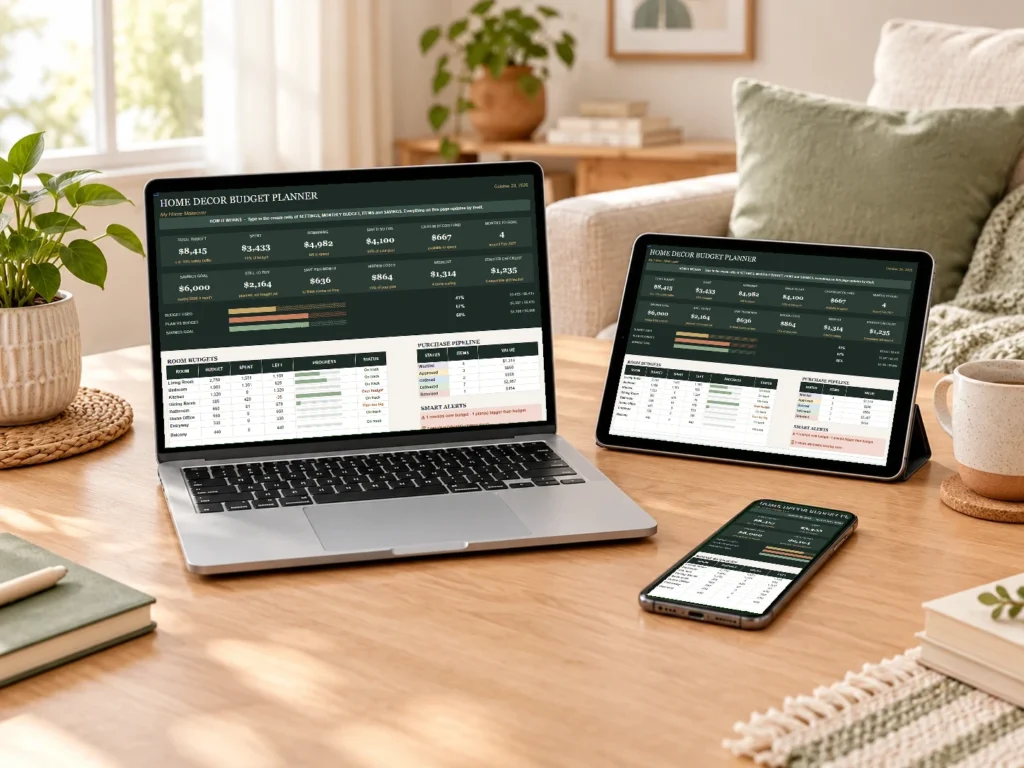
What the home decor budget planner does for you
Most budgeting templates stop at income and bills. Most decor planners stop at mood boards. This home decor budget planner joins the two, so your money plan and your room plan finally live in the same place.
It opens on a dashboard that updates by itself. Twelve live cards show your total budget, money spent, money left, savings, cash in your decor fund and the months left until your goal. Below them, three progress bars and a room-by-room table tell you at a glance whether each space is on track.
Everything else is built around a simple daily habit. Add a piece you want, move it along from wishlist to delivered, and log what you save each month. The planner does the math, the colors and the warnings.
How the home decor budget planner keeps every room on track
Each room gets its own budget and an optional “finish by” date. A small safety buffer, ten percent by default, is added on top, because real projects always bring a surprise or two.
When you add an item, you type its price, tax, shipping and assembly. The planner adds them into a true cost, so the sofa that looked like $899 shows up as the $1,060 it really is. Those hidden costs are also totaled on the dashboard, which is often the moment people understand where their decor money went.
Every room then shows one of four plain statuses: on track, almost used, plan too big or over budget. If you set a finish-by date, the planner also tells you how much to put aside each month to finish that room in time, and compares it with what you actually save.
Smart alerts that catch costly mistakes
Ten alerts inside the home decor budget planner watch your plan in the background, so you don’t have to remember everything yourself. They look at deadlines, money and habits.
- Return windows: you’re warned a few days before the last day to send something back.
- Warranties: a reminder appears before a warranty runs out, while it can still help.
- Impulse buys: items you mark as a “want” wait in a short cool-off, three days by default, before the planner asks if you still want them.
- Your monthly budget: if your saving target is higher than your income and bills can comfortably carry, the planner says so, kindly and clearly.
There is also a gentle guard against typing mistakes. Number and date cells refuse stray letters, so one slip of the keyboard can’t quietly break your totals.
Tools for the hard decisions
Some of the best features of this home decor budget planner are for the moments when you’re stuck between two choices. The Price Compare tab lines up the same piece from three stores and highlights the cheapest total and the best value for your money.
DIY vs Buy works out whether making something yourself really saves money once you count materials, tools and the value of your time. The Decision Helper scores a piece on need, budget fit, quality and style, then suggests buying now, waiting or skipping, and even shows the cost per use.
For bigger projects there is a Room Planner that turns your measurements into floor area, wall area and paint needed, plus a Starter Checklist of more than sixty essentials for a first apartment or new home. If you share a home, the Split tab shows who paid what, who owes whom and what each person’s pieces are worth today. You might like to pair it with our bathroom decor ideas on a tight budget when you plan your first room.
Who this home decor budget planner is for
It suits anyone who wants a beautiful home without the money stress. First apartments, couples moving in together, new homeowners and anyone refreshing a single room all use it the same way.
You don’t need spreadsheet skills. Cream cells are the ones you type in, grey cells calculate on their own, and the dropdowns do the rest. A filled-in example file lets you see every feature working before you start your own plan.
It is also a good fit if you like to plan slowly. Seeing the months to your goal and the real cost of every piece makes it easier to wait for the right item instead of the first one.
Google Sheets or Excel: how you get started
After checkout you download a short Quick-Start guide. Its first page holds a link to a four-minute video walkthrough and four buttons: a blank planner and a filled example, each for Google Sheets or for Microsoft Excel.
For Google Sheets you sign in, press “Make a copy”, and the planner is saved privately in your own Google Drive, so it works on your phone, tablet and computer. Google explains the copy step in its own help page on copying and sharing files. For Excel, the file downloads straight away and works in Excel 2010 or newer.
The home decor budget planner is an organizing tool for your own records, not financial advice. Its rules of thumb, like the safety buffer, are starting points you can change in Settings to match your home and your life.
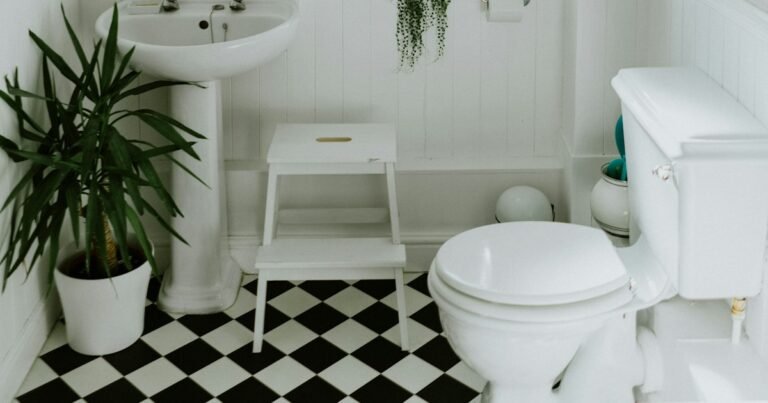 See it in a room
Bathroom Decor Ideas on a Tight Budget Made Easy
Read the free tutorial
See it in a room
Bathroom Decor Ideas on a Tight Budget Made Easy
Read the free tutorial
You may also like
All planners & templates guides
Questions
Is this a digital download?
Yes. Nothing is shipped. After checkout you download a PDF guide with links to your planner files and the video.
Do I need Google Sheets or Excel?
Either works. Google Sheets is free with a Google account and works on phone and computer. The Excel version works in Excel 2010 or newer.
Do I need spreadsheet skills?
No. You type in the cream cells and pick from dropdowns. Everything else calculates by itself, and a filled example shows how it works.
Can I change the currency and the rooms?
Yes. Type any currency symbol and rename or add rooms and categories in Settings.
Can I share it with my partner?
Yes, share your own copy with them. Please don't share the original links or resell the planner: it is for personal use.
How do I get my guide?
Checkout opens on Whop. After payment, Whop emails your receipt with access to the PDF.
Can I print the guides?
Yes. Print them at home or at a print shop, or follow along on your phone or tablet.
Is this a physical product?
No. You buy a digital PDF guide. Nothing is shipped.
What if my file does not open?
Write to us through the Contact page and we will sort it out.